Why Cumulative Layout Shift (CLS) Matters for Every Website
Have you ever clicked a button on a website, only for it to suddenly move right before you hit it? Or maybe you were reading an article and the text shifted because an image above finally loaded? That frustrating experience is the result of a high Cumulative Layout Shift (CLS) and it’s a silent killer of user experience.
In today’s digital landscape, web performance is not just about loading speed. It’s also about visual stability ensuring that what users see stays consistent as the page loads. Google’s Core Web Vitals, including CLS, are designed to measure how real users perceive your site. And since 2021, CLS has been a ranking factor, influencing how your site performs in search results.
In this guide, you’ll discover exactly what CLS is, why it matters, how it’s measured, and most importantly how to fix it.
Understanding Web Performance and Core Web Vitals
What Are Core Web Vitals?
Core Web Vitals are Google’s key performance metrics that measure real-world user experience. They include:
- Largest Contentful Paint (LCP): Measures loading performance.
- First Input Delay (FID): Measures interactivity.
- Cumulative Layout Shift (CLS): Measures visual stability.
Each of these represents a pillar of web optimization. Together, they define how smooth, responsive, and stable your website feels to visitors.
How CLS Fits into Google’s Ranking Algorithm
Google uses Core Web Vitals to determine how pleasant a website feels to use. CLS plays a major role because unexpected layout shifts lead to user frustration and trust issues key signals Google interprets as poor user experience.
A good CLS score (below 0.1) can help improve your ranking, while anything above 0.25 signals a need for improvement.
What Is Cumulative Layout Shift (CLS)?
The Definition of CLS
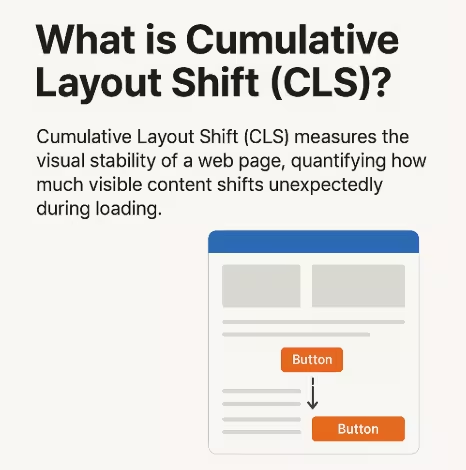
Cumulative Layout Shift (CLS) measures how much visible content moves around on the screen while a webpage loads. The smaller the shift, the better the page stability.
CLS doesn’t measure movement caused by user interaction (like expanding menus). Instead, it focuses on unexpected movements like an image loading late or an ad resizing itself.
How CLS Impacts User Experience?
A shifting layout breaks the sense of control and trust. When users expect a stable interface, sudden changes disrupt their flow.
High CLS can lead to:
- Misclicks (especially on mobile)
- Abandoned pages
- Reduced conversions
- Negative brand perception
Examples of Bad CLS in Real Websites
- News sites where ads push content mid-read
- E-commerce pages where “Buy Now” buttons move when images load
- Blog layouts shifting when web fonts render
These seemingly small changes can create a big impact on design consistency and overall usability.
How CLS Is Calculated? The Technical Breakdown
Understanding Layout Shifts and Impact Fraction
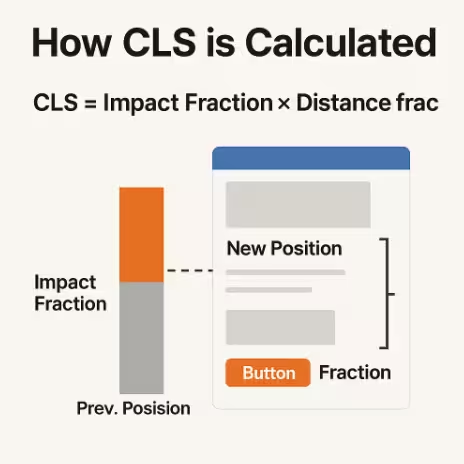
CLS is calculated as:
CLS = Impact Fraction × Distance Fraction
- Impact Fraction: How much of the screen is affected by movement.
- Distance Fraction: How far elements move relative to the viewport.
The Role of Browser Metrics in Measuring CLS
Modern browsers (like Chrome) continuously track layout shifts using browser metrics. These measurements are compiled into tools like Lighthouse and CrUX, giving developers real-time insights into visual stability.
How Page Rendering Affects CLS Scores?
During page rendering, browsers load HTML, CSS, and scripts in sequence. Delays or asynchronous loading can cause elements to appear late leading to layout shifts.
Optimizing the rendering path is crucial to maintaining page stability.
Why Visual and Page Stability Are Crucial for Web Optimization?
Visual Stability vs. Design Consistency
While design consistency focuses on uniform layouts and branding, visual stability ensures those elements don’t jump around during loading. A consistent design still needs stable rendering to offer seamless interaction.
How Layout Shifts Reduce Conversion Rates
According to studies, even a 0.1 increase in CLS can reduce conversions by up to 15% on e-commerce sites. Users lose trust when the interface feels unpredictable.
Common Causes of Poor CLS
Unsized Images and Videos
When media elements don’t have defined width and height attributes, browsers can’t allocate space for them before loading causing shifts when they appear.
Dynamically Injected Content
Chat widgets, cookie banners, and dynamic ads often push existing content down, especially on mobile devices.
Web Fonts Causing FOUT/FOIT
Custom fonts can cause “Flash of Unstyled Text” (FOUT) or “Flash of Invisible Text” (FOIT), shifting content as text re-renders.
Animations and Third-Party Scripts
Improperly coded animations or third-party embeds (like social widgets) can modify layout flow unexpectedly.
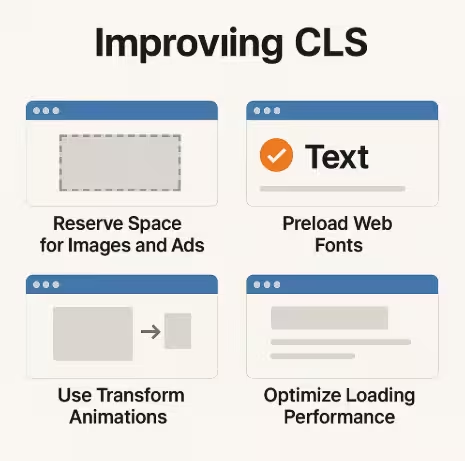
How to Improve CLS? Proven Optimization Techniques
Optimizing Cumulative Layout Shift (CLS) requires both design discipline and technical precision. The key is to eliminate unexpected movement during page loading by controlling how elements are rendered, loaded, and displayed. Let’s explore the most effective ways to reduce CLS and improve visual stability.
Reserve Space for Images and Ads
One of the most common causes of layout shifts is unsized media images, videos, and ads that load dynamically without defined space. To fix this:
- Always include width and height attributes or use CSS aspect-ratio boxes.
- For ads, define a reserved area even before the ad loads.
- When using responsive images, apply consistent ratios using
srcsetandsizes.
This ensures the browser knows how much space to allocate in the layout before content appears.
Preload Important Web Fonts
Fonts can cause FOUT (Flash of Unstyled Text) or FOIT (Flash of Invisible Text) when they load late. These flashes cause noticeable shifts in content.
To prevent this:
- Use the
font-display: optionalorswapproperty in CSS. - Preload critical fonts using
<link rel="preload">. - Optimize font files to include only necessary character sets.
This improves loading performance while maintaining design consistency.
Use Transform Animations Instead of Position Changes
Avoid animations that trigger layout recalculations. Instead, use CSS transforms and opacity for transitions, since they don’t affect layout flow. For example:
.bad-animation {
  top: 10px; /* causes layout shift */
}

.good-animation {
  transform: translateY(10px); /* stable and smooth */
}
This preserves page stability while delivering fluid, user-friendly interactions.
Optimize Loading Performance with Lazy Loading
Lazy loading helps defer offscreen images or videos, but it can also cause layout shifts if not implemented carefully. To prevent this:
- Use placeholder elements or skeleton loaders with fixed heights.
- Always define dimensions in CSS.
- Avoid lazy-loading above-the-fold content.
Properly implemented lazy loading enhances web performance and minimizes layout shifts.
Tools to Measure and Monitor CLS
Optimizing CLS requires continuous tracking. Thankfully, several browser metrics and testing tools are available to help developers identify and fix layout instability.
Google Lighthouse and PageSpeed Insights
These tools analyze your site’s Core Web Vitals, including CLS. They simulate how users experience your website and provide actionable recommendations for improvement.
To use:
- Go to PageSpeed Insights.
- Enter your site URL.
- Review the CLS score (Good: <0.1, Needs Improvement: 0.1–0.25, Poor: >0.25).
They also highlight problematic elements that cause layout shifts.
Chrome User Experience Report (CrUX)
CrUX gathers real-world performance data from Chrome users. It’s a reliable source of field data that reflects actual user experience instead of synthetic tests.
Developers can access CrUX data through Google’s BigQuery or PageSpeed API to monitor visual stability trends over time.
Web Vitals Chrome Extension
The Web Vitals Extension offers instant feedback while browsing. It displays CLS, LCP, and FID scores directly on your page, helping developers make quick improvements during design and testing phases.
Best Practices for Web Designers and Developers
Creating a visually stable and user-friendly site requires collaboration between design and development teams. Here’s how to ensure your website remains CLS-free.
Designing for Consistency and Predictability
Designers should prioritize predictable layouts where content placement doesn’t surprise users.
Guidelines include:
- Using consistent padding, margins, and grid systems.
- Avoiding unexpected banner placements.
- Keeping interactive elements fixed in place.
Predictable design reduces the likelihood of layout shifts and builds user trust.
Testing Layout Stability Across Devices
A page may appear stable on desktop but shift on mobile due to differing viewport sizes.
Always test:
- On multiple screen resolutions.
- With varied connection speeds.
- On devices with different pixel ratios.
Tools like BrowserStack and Responsively App help ensure consistent page rendering across environments.
Maintaining Performance Over Time
Even if your CLS score is good today, site updates, plugin installations, or ad changes can cause regressions.
Maintain performance discipline by:
- Setting up automated Web Vitals monitoring.
- Reviewing CLS scores after every major update.
- Conducting quarterly performance audits.
Consistency over time ensures a stable user experience and strong SEO performance.
CLS in Relation to Other Web Vitals (LCP & FID)
How CLS Complements LCP and FID Metrics?
While LCP measures how quickly the largest element loads, and FID tracks responsiveness, CLS evaluates how visually stable the page remains during that loading process. Together, they form a complete picture of web performance.
A fast-loading site (good LCP) can still frustrate users if its layout shifts (bad CLS). Therefore, optimizing for all three Core Web Vitals ensures a balanced, pleasant experience.
Balancing Visual Stability with Loading Speed
Sometimes developers prioritize load speed so aggressively that they compromise stability for instance, loading elements asynchronously without reserving space. The key is to balance both using:
- Preloading critical elements.
- Defining static layouts.
- Minimizing deferred content injection.
Balanced optimization leads to both high performance and visual integrity.
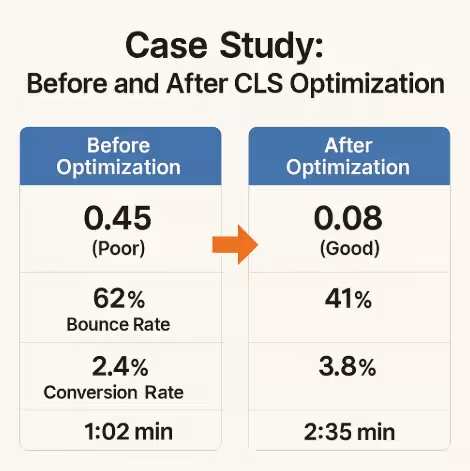
Case Study: How Reducing CLS Improved Conversions
Example, E-Commerce Site Before and After Optimization
A leading online retailer experienced a CLS score of 0.45, with frequent shifts in product cards and buttons. After implementing CLS best practices:
| Metric | Before Optimization | After Optimization |
|---|---|---|
| CLS Score | 0.45 (Poor) | 0.08 (Good) |
| Bounce Rate | 62% | 41% |
| Conversion Rate | 2.4% | 3.8% |
| Average Session Duration | 1:02 min | 2:35 min |
Key actions taken:
- Added fixed dimensions to product images.
- Preloaded web fonts.
- Used transform-based animations.
- Introduced skeleton loaders for delayed content.
The result: improved page stability, higher engagement, and a 58% boost in conversion rate.
The Future of CLS and Web Performance Optimization
Browser-Level Improvements
Modern browsers are evolving to automatically detect and prevent layout shifts. For instance, Chrome’s Layout Instability API helps identify unstable elements during rendering, guiding developers toward more stable design patterns.
AI and Predictive Layout Stability Tools
Emerging AI-driven optimization tools can predict layout shifts before they happen. These systems analyze your page structure and recommend dynamic fixes like preallocating space or adjusting DOM priority to ensure seamless page rendering.
The future of web optimization will rely on predictive systems that not only monitor CLS but proactively prevent it.
FAQs About Cumulative Layout Shift (CLS)
1. What is a good CLS score?
A CLS score below 0.1 is considered good, between 0.1–0.25 needs improvement, and above 0.25 is poor.
2. Does CLS affect SEO rankings?
Yes. CLS is part of Google’s Core Web Vitals, which directly impact search rankings by measuring user experience and visual stability.
3. Can third-party ads cause CLS?
Absolutely. Ads are a common source of layout shifts. Always reserve space for ad slots to maintain page stability.
4. How can I measure CLS in real time?
Use the Web Vitals Chrome Extension or Google Lighthouse for immediate feedback on your website’s layout performance.
5. Does lazy loading affect CLS?
Yes, if implemented incorrectly. Always define placeholders for lazy-loaded images and avoid using it above the fold.
6. How often should I monitor CLS?
You should monitor CLS continuously, especially after content updates, design changes, or adding new plugins.
7. What’s the difference between CLS and LCP?
LCP measures loading speed, while CLS measures visual stability. Both are part of the Core Web Vitals trio.
Achieving Page Stability and Better User Experience
Cumulative Layout Shift (CLS) is more than a technical metric, it’s a measure of trust, usability, and design quality. A visually stable website signals professionalism, reliability, and attention to detail.
By combining proper layout design, optimized loading performance, and continuous monitoring, you can ensure your website not only looks great but also feels stable and predictable to every user.
In a digital world where milliseconds matter, mastering CLS is key to creating experiences users love and search engines reward.