

Understanding Largest Contentful Paint (LCP)
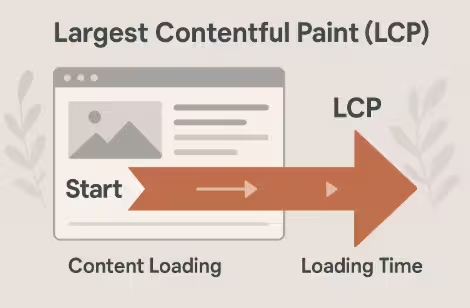
Largest Contentful Paint (LCP) is one of Google’s Core Web Vitals metrics used to measure loading performance and visual stability. It tracks the time taken for the largest visible content element such as an image, video, or block of text to load within the user’s viewport.
Why LCP Matters
A fast LCP helps users perceive your site as responsive and reliable. A delay beyond 2.5 seconds can drastically increase bounce rates. According to Google, websites with LCP under 2.5 seconds tend to rank higher and yield better user engagement.
The Ideal LCP Score
| Rating | LCP (in seconds) | Description |
|---|---|---|
| Good | ≤ 2.5s | Excellent performance |
| Needs Improvement | 2.5s – 4s | Some optimization required |
| Poor | > 4s | Immediate action needed |
The Role of LCP in Core Web Vitals
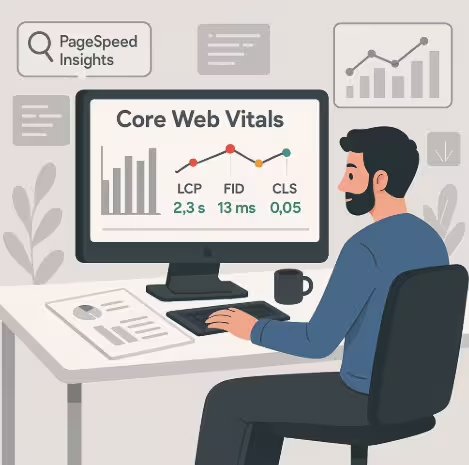
LCP is one of three key metrics that define Core Web Vitals, alongside First Input Delay (FID) and Cumulative Layout Shift (CLS). Together, these metrics determine a website’s user experience score.
When LCP is poor, users experience delays in viewing main content damaging trust and conversions. For eCommerce or content-heavy websites, improving LCP can directly boost sales, time on site, and SEO visibility.
Common Causes of Poor LCP Scores
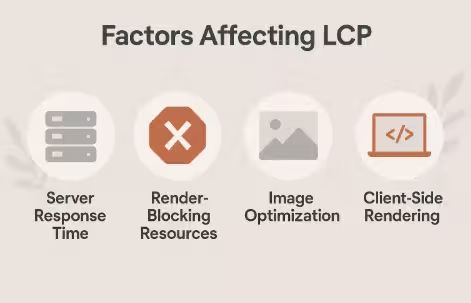
- Slow Server Response Time (TTFB) – High latency or underpowered hosting affects all page load elements.
- Unoptimized Images and Videos – Heavy media files delay rendering.
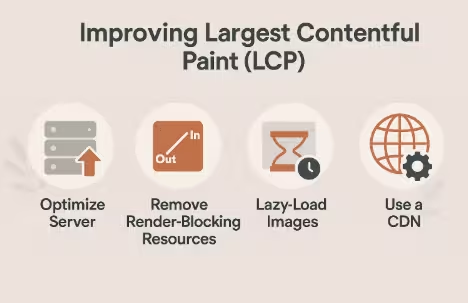
- Render-Blocking CSS and JS – Prevents the browser from displaying visible elements early.
- Client-Side Rendering Delays – Over-reliance on JavaScript frameworks increases LCP.
- Third-Party Scripts – Ads, analytics, and widgets often increase blocking time.
Strategy 1 – Optimize Server Response Time (TTFB)
Time to First Byte (TTFB) is the time a browser waits to receive the first byte of content from your server. A slow TTFB leads to higher LCP.
How to Improve It
- Upgrade Hosting: Move to a faster provider or a dedicated VPS.
- Use CDN (Content Delivery Network): Distribute static assets globally for faster access.
- Optimize Database Queries: Remove redundant operations.
- Enable Caching: Cache static and dynamic content efficiently.
Tip: Tools like Cloudflare and Google Cloud CDN help significantly reduce server latency.
Strategy 2 – Optimize and Compress Images
Images often account for the largest visual element on a page making them critical for LCP optimization.
Best Practices
- Use Next-Gen Formats: Convert images to WebP or AVIF for smaller file sizes.
- Implement Lazy Loading: Defer offscreen image loading until necessary.
- Responsive Images: Serve appropriate sizes using the
srcsetattribute. - Compress Before Upload: Tools like TinyPNG or ImageOptim can help.
Optimized images can improve LCP by up to 40% without affecting visual quality.
Strategy 3 – Minify CSS, JavaScript, and HTML
Every unnecessary line of code adds to loading time. Use tools like Terser, UglifyJS, or CSSNano to minify and combine assets.
Techniques:
- Defer Non-Critical JS: Load scripts after main content renders.
- Inline Critical CSS: Improve render priority.
- Use HTTP/2: Allow simultaneous requests for better efficiency.
Strategy 4 – Improve Client-Side Rendering
Modern frameworks like React or Angular may delay LCP due to JavaScript hydration.
Fixes:
- Use Server-Side Rendering (SSR) for faster content paint.
- Simplify DOM structure and reduce nested elements.
- Cache API responses and pre-render static content.
Strategy 5 – Implement Efficient Caching and Preloading
Effective Methods:
- Browser Caching: Define cache headers for images, CSS, and JS.
- Service Workers: Enable offline caching.
- DNS Prefetch & Preload: Load critical resources earlier.
This ensures the largest content appears almost instantly on repeat visits.
Strategy 6 – Remove or Defer Third-Party Scripts
Third-party tags (like tracking, chat widgets, or ads) can delay LCP. Audit your site with Lighthouse to detect slow external calls.
Optimize by:
- Loading analytics scripts asynchronously.
- Removing unnecessary tags.
- Hosting third-party resources locally when possible.
Strategy 7 – Monitor, Measure, and Continuously Improve
Optimization is an ongoing process. Use these tools to track improvements:
- Google PageSpeed Insights
- Lighthouse
- WebPageTest
- Chrome User Experience Report
Monitor your Core Web Vitals regularly as even minor code updates can shift LCP scores.
Mobile Performance Optimization for LCP
Mobile users expect speed and stability. To improve LCP on mobile:
- Implement responsive design.
- Use AMP (Accelerated Mobile Pages) for news or blog sites.
- Avoid excessive animations.
- Compress and prioritize visible content.
Advanced Tools to Analyze LCP
| Tool | Function | Ideal Use |
|---|---|---|
| Chrome DevTools | Real-time performance audit | Local testing |
| Lighthouse | Automated performance scoring | Core Web Vitals monitoring |
| WebPageTest | Waterfall load analysis | Detailed render timing |
| RUM | Real-world performance data | Continuous tracking |
Real-World Case Study: Improving LCP in Practice
A travel booking website reduced its LCP from 4.2s to 1.8s by:
- Switching to a faster CDN.
- Optimizing hero images.
- Deferring heavy scripts.
As a result, bounce rate dropped by 27%, and conversions rose by 18%.
FAQs about Largest Contentful Paint (LCP)
1. What is the main difference between LCP and FID?
LCP measures loading performance, while FID measures interactivity delay.
2. How can I check my site’s LCP score?
Use PageSpeed Insights or Lighthouse both provide Core Web Vitals metrics.
3. What’s a good LCP score?
Anything under 2.5 seconds is considered good.
4. Does image format affect LCP?
Yes. Use modern formats like WebP or AVIF for faster rendering.
5. Can LCP improvements boost SEO?
Definitely, faster LCP improves both ranking and user engagement.
6. What’s the ideal strategy for mobile LCP optimization?
Focus on lightweight assets, responsive design, and CDN delivery.
Conclusion
Improving Largest Contentful Paint (LCP) is no longer optional, it’s vital for SEO success, user satisfaction, and business growth. By implementing the seven proven strategies discussed here from optimizing servers to minifying code you can dramatically enhance web performance, reduce bounce rates, and create a faster, more enjoyable user experience.