

What Are Plugin Cookies and Why They Matter?
Plugin cookies are small data files created by plugins to store, retrieve, and process user-related information directly within a web browser. While they may seem insignificant in size, plugin cookies play a critical role in how modern websites function, perform, and comply with privacy regulations.
At their core, plugin cookies act as short-term or long-term memory for a website. They allow plugins to recognize returning users, preserve sessions, apply personalized settings, and support analytics systems. Without plugin cookies, many essential features such as user logins, shopping carts, consent banners, and analytics tracking would simply not work.
What makes plugin cookies different from basic website cookies is their purpose-driven design. Each plugin creates cookies to serve a specific function, whether it’s security verification, form handling, user consent logging, or website analytics measurement. In WordPress environments especially, plugin cookies are deeply woven into daily site operations.
From a business perspective, plugin cookies matter because they directly affect:
- User experience and retention
- Data accuracy for analytics
- Legal compliance with privacy laws
- Website performance and security
Ignoring how plugin cookies work or misusing them can lead to compliance risks, broken functionality, and loss of user trust.
Definition of Plugin Cookies
A plugin cookie is a browser-stored text file generated by a plugin rather than the website’s core system. These cookies store small pieces of information such as session IDs, preference values, timestamps, or anonymous identifiers.
Unlike server-side storage, plugin cookies live on the user’s device. When the user revisits the site, the browser sends the cookie back to the server, allowing the plugin to “remember” previous interactions.
Plugin cookies are commonly categorized as:
- Essential cookies (login sessions, security)
- Preference cookies (language, theme)
- Analytics cookies (traffic measurement)
- Compliance cookies (consent tracking)
Understanding this distinction is essential for proper cookie management and legal compliance.

How Plugin Cookies Work Behind the Scenes?
Behind the scenes, plugin cookies follow a simple but powerful cycle:
- A user performs an action (visit, login, submit a form)
- The plugin triggers a cookie creation command
- The browser stores the cookie locally
- On future requests, the cookie is sent back automatically
- The plugin reads the cookie and responds accordingly
This process happens in milliseconds and is invisible to users. However, it enables complex functionality such as session tracking, personalized content delivery, and secure authentication.
Modern plugins also define expiration dates, encryption flags, and browser compatibility rules to ensure plugin cookies behave consistently across devices and environments.
The Role of Plugin Cookies in Modern Websites
Plugin cookies are no longer optional. They are a foundational technology that supports nearly every interactive feature users expect from a modern website.
User Experience and Personalization
Personalization is one of the strongest benefits of plugin cookies. When a website remembers user preferences, it feels faster, smarter, and more welcoming. Plugin cookies enable features such as:
- Remembered login states
- Saved form data
- Language and region preferences
- Dark mode or layout settings
These enhancements reduce friction and frustration. Users don’t need to repeat actions, reconfigure settings, or re-enter information. This directly improves engagement, time-on-site, and conversion rates.
From an SEO standpoint, improved user experience indirectly boosts rankings by lowering bounce rates and increasing session duration.
Session Tracking and Data Storage
Session tracking is another major role of plugin cookies. A session allows a website to treat multiple page views as part of a single visit. Plugin cookies store session identifiers that:
- Keep users logged in
- Prevent session hijacking
- Maintain cart contents
- Enable step-by-step processes
Regarding data storage, plugin cookies are designed to store minimal data. Best practices dictate storing references or tokens rather than raw personal information, ensuring both efficiency and security.
Plugin Cookies in WordPress Environments
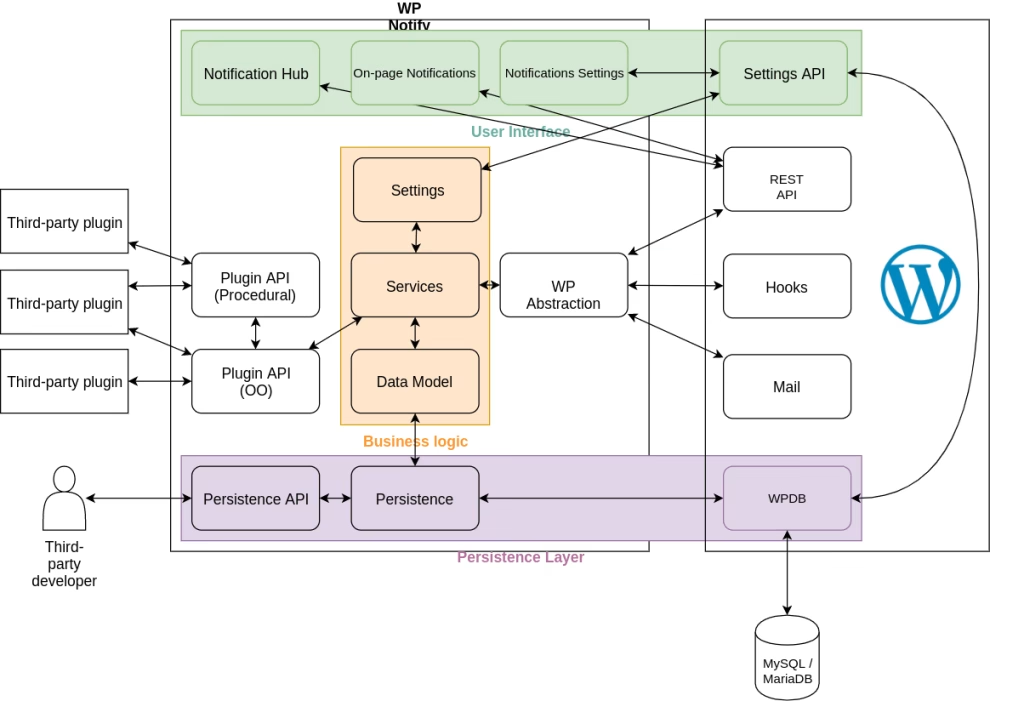
WordPress is one of the most plugin-dependent ecosystems in the world. As a result, WordPress plugin cookies are especially common and powerful.
How WordPress Plugin Cookies Are Created?
In WordPress, plugins hook into lifecycle events such as initialization, login, form submission, or checkout. During these events, plugins may create cookies using secure browser instructions.
Most WordPress plugin cookies are first-party cookies, meaning they originate from the same domain as the website. This improves trust, browser compatibility, and compliance flexibility.
Plugins often use cookies to:
- Verify nonces and tokens
- Maintain admin and user sessions
- Store consent preferences
- Track anonymized analytics data
Popular Use Cases for WordPress Plugin Cookies
Some of the most common and practical use cases include:
- E-commerce plugins: Preserve cart items and checkout states
- Membership plugins: Maintain login sessions
- Analytics plugins: Measure visits and behavior
- Security plugins: Detect suspicious activity
- Compliance plugins: Store consent logs
Without WordPress plugin cookies, these features would require far more server resources and would significantly slow down websites.
Cookie Management: Best Practices
Cookie management is about control, transparency, and optimization. Poor cookie management leads to legal risk, performance issues, and user distrust.
Effective cookie management ensures:
- Only necessary cookies are used
- Cookies expire appropriately
- Users understand what’s being stored
- Compliance tools function correctly
Managing First-Party vs Third-Party Cookies
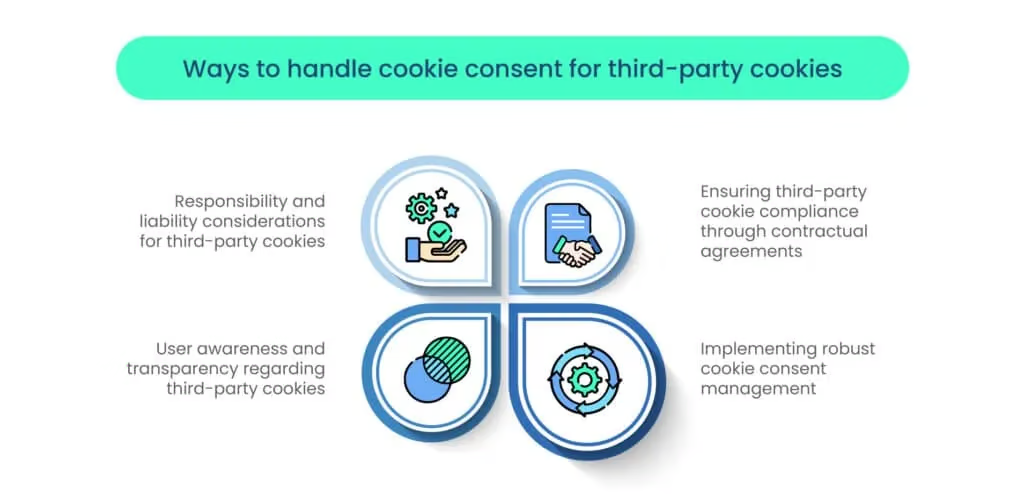
First-party cookies are created by your own domain and are generally considered safer and more privacy-friendly. Third-party cookies originate from external services and require extra care.
Best practice:
- Prefer first-party plugin cookies
- Minimize third-party cookies
- Disclose all cookie sources clearly
Tools for Cookie Management
Modern cookie management tools categorize cookies automatically, block unauthorized cookies, and log consent records. These tools integrate deeply with WordPress plugin cookies, reducing manual effort while improving compliance accuracy.
Privacy Settings and User Consent
Privacy settings define how much control users have over their data. Plugin cookies must respect these settings at all times.
Why User Consent Is Essential?
User consent is both a legal requirement and a trust signal. Consent ensures users knowingly allow plugin cookies to operate beyond essential functionality.
Without consent:
- Non-essential cookies must remain inactive
- Analytics tracking must be disabled
- Marketing cookies must be blocked
This protects both users and website owners.
Designing Clear Privacy Settings
Clear privacy settings avoid confusion and frustration. Use simple language, clear categories, and visible controls. Allow users to change their choices at any time.
Good privacy settings increase acceptance rates and reduce bounce rates.
Compliance Tools and Legal Requirements
Compliance is one of the most critical reasons plugin cookies must be handled correctly. As privacy laws evolve worldwide, websites are expected to prove transparency, accountability, and user control. Plugin cookies sit at the center of this requirement because they are directly responsible for storing and processing user-related data.
Failing to manage compliance properly can result in:
- Legal penalties and fines
- Forced suspension of services
- Loss of user trust
- SEO and reputation damage
This is why modern websites rely heavily on compliance tools specifically designed to control plugin cookies.
GDPR, CCPA, and Global Regulations
Privacy regulations differ by region, but they share common principles: transparency, consent, and data minimization.
GDPR (Europe) requires websites to:
- Clearly disclose all plugin cookies
- Obtain user consent before setting non-essential cookies
- Allow users to withdraw consent
- Document consent records
CCPA (California) focuses on:
- Informing users about data collection
- Allowing users to opt out
- Limiting the sale or sharing of data
Other regions are introducing similar frameworks, making compliance a global responsibility rather than a regional one.
Plugin cookies must be categorized properly under these laws:
- Essential cookies (allowed by default)
- Functional cookies
- Analytics cookies
- Marketing cookies
Incorrect categorization is one of the most common compliance failures.
Compliance Tools for Plugin Cookies
Compliance tools automate what would otherwise be an impossible manual process. These tools integrate directly with plugin cookies and perform tasks such as:
- Scanning and identifying cookies
- Blocking cookies until consent is granted
- Recording consent timestamps
- Updating cookie policies dynamically
Advanced compliance tools also adapt to changes in privacy laws, ensuring long-term protection. When configured correctly, they reduce legal risk while preserving website functionality.
Website Analytics and Plugin Cookies
Website analytics provide insight into how visitors interact with a site. Without analytics, decisions are based on assumptions rather than evidence. Plugin cookies make analytics possible by enabling session continuity and user recognition.
However, analytics must be implemented responsibly.
Tracking Behavior Responsibly
Responsible tracking means collecting only what is necessary. Plugin cookies used for website analytics typically store anonymized identifiers rather than personal data.
Responsible tracking focuses on:
- Page views and session duration
- Navigation paths
- Device and browser types
- Performance metrics
When plugin cookies are configured properly, analytics data becomes a tool for improvement rather than surveillance.
Balancing Analytics with Privacy
Balancing analytics with privacy is one of the biggest challenges modern websites face. Users want better experiences, but they also want control.
Best practices include:
- Offering opt-in analytics cookies
- Using privacy-friendly analytics plugins
- Limiting data retention periods
- Avoiding unnecessary third-party tracking
This balance builds trust and ensures long-term sustainability.
Security Features of Plugin Cookies
Security is often overlooked when discussing plugin cookies, yet it is one of their most important aspects. Improperly configured cookies can expose websites to serious threats.
Preventing Cookie-Based Attacks
Cookie-based attacks such as session hijacking or cross-site scripting occur when cookies are not properly secured.
Security-focused plugin cookies use:
- HttpOnly flags to block script access
- Secure flags to require HTTPS
- SameSite attributes to prevent cross-site misuse
These measures significantly reduce vulnerability without impacting usability.
Secure Data Storage Techniques
One of the golden rules of cookie security is never store sensitive information directly inside cookies.
Instead:
- Store encrypted tokens
- Use server-side validation
- Limit cookie lifespan
- Rotate session identifiers regularly
Secure data storage techniques ensure plugin cookies remain a strength rather than a liability.
Browser Compatibility and Performance
Browser compatibility ensures plugin cookies behave consistently across different environments. A cookie that works in one browser but fails in another can break functionality and frustrate users.
Ensuring Cross-Browser Compatibility
Browsers handle cookies slightly differently, especially regarding expiration rules and SameSite policies.
To ensure compatibility:
- Test plugin cookies across major browsers
- Avoid deprecated cookie attributes
- Use standardized formats
- Monitor browser updates regularly
Compatibility testing prevents silent failures that are difficult to diagnose.
Performance Optimization
Every cookie sent with a request increases payload size. Too many cookies can slow down page loads, especially on mobile devices.
Performance optimization strategies include:
- Removing unused plugin cookies
- Shortening expiration times
- Limiting cookie size
- Consolidating redundant cookies
Optimized plugin cookies improve speed, SEO, and user satisfaction.
Common Mistakes with Plugin Cookies
Even experienced site owners make mistakes with plugin cookies. Understanding these pitfalls helps prevent costly errors.
Common mistakes include:
- Setting cookies before user consent
- Failing to document cookie usage
- Storing sensitive data in cookies
- Ignoring browser compatibility updates
- Forgetting to update cookie policies
Each mistake increases legal risk and erodes trust. Regular audits are the best prevention.
Future Trends in Plugin Cookies
The future of plugin cookies is shaped by privacy-first design and evolving regulations. While cookies are not disappearing, they are becoming more transparent and controlled.
Expected trends include:
- Shorter cookie lifespans
- Increased user control dashboards
- Privacy-focused analytics models
- Tighter browser restrictions
- Smarter compliance automation
Websites that adapt early will maintain functionality without disruption.
Frequently Asked Questions
Conclusion
Plugin cookies may be small in size, but they have an enormous impact on modern websites. From cookie management and privacy settings to user consent, website analytics, and security features, they influence nearly every digital interaction.
When implemented responsibly, plugin cookies:
- Improve user experience
- Strengthen security
- Enable data-driven decisions
- Ensure legal compliance
- Support long-term scalability
Rather than fearing plugin cookies, website owners should understand and control them. Mastery of plugin cookies is no longer optional—it is a defining factor of professional, compliant, and high-performing websites.