
Search engine optimization is one of the most important parts of managing a website, and when you’re working on a well-known platform like WordPress, selecting the right WordPress Plugin can make or break your SEO success. From improving on-page optimization to enhancing Core Web Vitals, plugins help streamline tasks that would be nearly impossible to manage manually. Whether you’re a site owner, blogger, agency, or a Freelance WordPress Website Developer, having the right tools is essential for ranking higher on search engines.
In this complete guide, you’ll learn exactly which plugins boost SEO, how to use them, how to safely update them, and how to maintain long-term SEO stability without compromising performance or security. You’ll also discover new trends from 2024–2025 that influence plugin selection, from AI-powered optimization tools to user experience requirements driven by recent Google algorithm changes.

Understanding the Role of a WordPress Plugin in Modern SEO
A WordPress Plugin is more than just an add-on, it’s a specialized tool that enhances your website’s ability to compete in search rankings. Modern SEO requires precision, constant monitoring, and rapid adjustments. Plugins provide features like metadata optimization, automatic sitemaps, breadcrumb schema, keyword suggestions, performance improvements, and link management.
A powerful SEO plugin acts like a dashboard that keeps you aware of your search visibility and highlights any issues that could cause traffic loss. With constant algorithm updates, your plugin must offer new features and compatibility upgrades otherwise, your rankings hit a plateau.
Why WordPress Plugin Matter for Technical SEO
For technical reasons, we chose to make a list of why WordPress plugins are important instead of explaining. Technical SEO involves tasks like:
- improving crawlability
- optimizing website structure
- strengthening internal links
- managing redirection issues
- generating schema markup
- controlling indexing behavior
- enhancing Core Web Vitals
Doing all this manually is time-intensive and inefficient. That’s why a WordPress Plugin plays a vital role performing tasks automatically in the background while giving site owners clear insights into their SEO health.
Modern plugins increasingly integrate AI-powered suggestions, real-time content scoring, and automated error detection, bridging the gap between manual optimization and fully automated workflows.
How a WordPress Plugin Enhances Content Optimization?
Content is still king, but it’s more complex than ever in 2025. A WordPress Plugin provide:
- keyword scoring systems
- readability recommendations
- schema-based content suggestions
- internal linking recommendations
- headline optimization tools
- advanced on-page SEO grading
A Freelance WordPress Website Developer typically relies on these tools to optimize blog articles and landing pages, ensuring each page aligns with Google’s latest content standards.
Key SEO Challenges on WordPress Websites (2024–2025 Trends)
SEO changes every year, and WordPress users must adapt quickly. The rise of AI search models, human-centric ranking systems, Google’s Helpful Content updates, and stricter user experience metrics have significantly reshaped how websites should be built and optimized.
Even with the best WordPress Plugin installed, you can only maintain strong rankings if you understand these modern challenges and tailor your SEO strategy around them. Below are the most relevant SEO issues faced on WordPress websites throughout 2024–2025.
Core Web Vitals & Site Experience Updates
Google continues to prioritize user experience through Core Web Vitals (CWV). The new 2025 Web Experience Thresholds focus heavily on:
- INP (Interaction to Next Paint) — replaces FID as the main responsiveness metric
- LCP (Largest Contentful Paint) — measures loading time
- CLS (Cumulative Layout Shift) — measures visual stability
Plugins like caching tools, image compression plugins, and optimization suites are becoming essential for meeting CWV targets. Modern SEO plugins integrate performance scanners that identify slow scripts, unoptimized images, excessive database size, and render-blocking resources.
Even if your content is outstanding, poor CWV scores can push your pages down in search rankings. That’s why performance-boosting plugins now play a critical role in SEO.
Indexing, Mobile-First, and Algorithm Behavior
Google’s Mobile-First Indexing is stricter than ever. Minimalist designs, mobile-friendly content structures, and efficient resource loading now have a major impact on overall rankings.
The latest algorithms evaluate:
- scroll behavior
- visual clutter
- intrusive pop-ups
- excessive layout shifts
- heavy JavaScript usage
- slow theme frameworks
This is why theme compatibility matters enormously when choosing or updating any WordPress Plugin. If a plugin conflicts with your theme and destabilizes mobile layout or functionality, your SEO performance will drop quickly.
Best WordPress Plugin Options to Improve SEO Performance
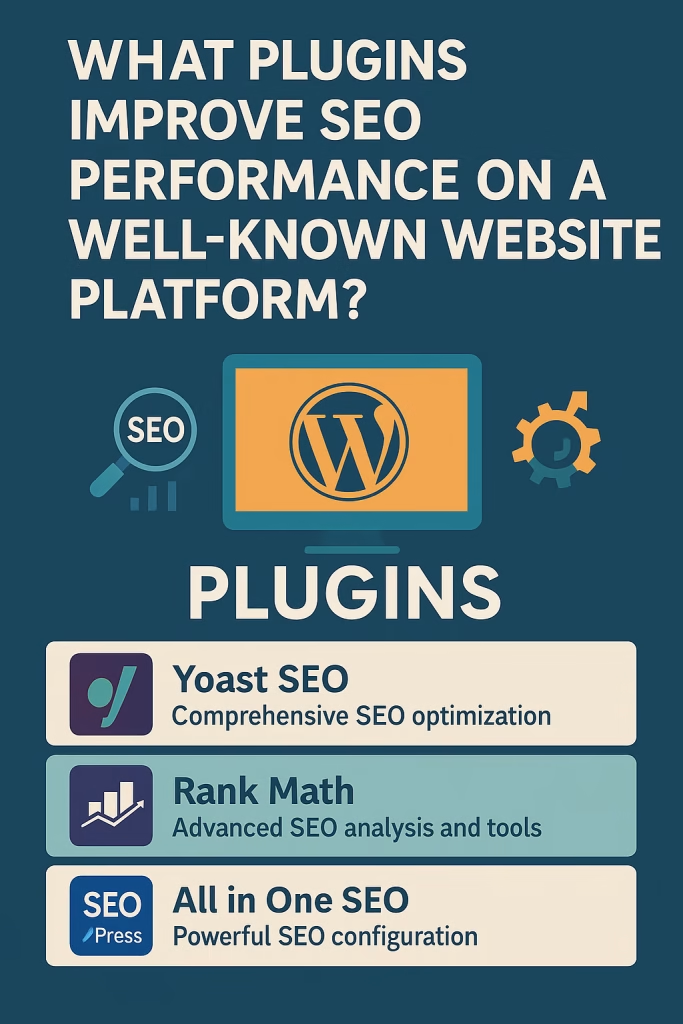
Now let’s explore the top plugin solutions for boosting visibility and improving search ranking on WordPress websites. These plugins remain popular among SEO experts, agencies, and every Freelance WordPress Website Developer because they provide measurable results.
Yoast SEO – The All-in-One Optimization Toolkit
Yoast SEO has been a leader in the SEO plugin market for over a decade, and its continuous innovation keeps it relevant in 2025.
Key Features
- Automated XML sitemaps
- Breadcrumb navigation
- Title and meta description templates
- Schema graph generator
- Readability scoring
- Internal linking suggestions
- Social metadata control
- AI tools for on-page optimization
Yoast is especially useful for beginners and mid-level SEO users who want a plug-and-play SEO framework that handles most tasks automatically.
Why Freelance WordPress Website Developers Prefer Yoast?
Experienced freelance WordPress website developers often choose Yoast because:
- It rarely creates theme conflicts
- Updates are stable and frequent
- It integrates well with page builders
- It provides consistent schema output
- Its database footprint is small
- It includes a powerful redirect manager
When managing multiple client sites, developers rely on Yoast because it’s predictable, secure, and well-coded three essential qualities for long-term SEO stability.
Rank Math – The Modern SEO Powerhouse
Rank Math is one of the fastest-growing SEO plugins, praised for its clean UI and deep feature set.
Why It Stands Out
- AI-assisted content writing and optimization
- Detailed SEO scoring
- Automated internal linking
- Powerful redirection tools
- Comprehensive schema builder
- Instant indexing integration
- Local SEO features
- Page speed suggestions
Rank Math is ideal for users seeking more advanced insights without purchasing multiple add-ons.
All in One SEO – Simple Optimization for Beginners
This plugin is designed for users who want simple, clear SEO tools.
Notable Features
- Basic on-page optimization
- Video SEO tools
- Custom XML sitemaps
- Local SEO add-ons
- WooCommerce SEO features for eCommerce
Its straightforward workflow makes it helpful for bloggers and beginners who want reliable SEO assistance.
SEOPress – Lightweight Yet Advanced SEO Plugin
SEOPress is popular for its speed-friendly structure and developer-friendly approach.
Benefits
- Minimal footprint (lightweight code)
- Full schema support
- Content analysis
- Simple UI
- White-label capabilities
- WooCommerce SEO tools
If your top priority is speed + clean code, SEOPress deserves serious consideration.
WordPress Plugin Update Best Practices for SEO Stability
Updating plugins is essential, but risky. A broken plugin can destroy site structure, break theme layouts, or ruin SEO-critical features such as:
- schema markup output
- meta tags
- canonical URLs
- indexation rules
- sitemaps
- security filters
This is why major WordPress maintenance workflows include strict updating discipline especially for SEO plugins. Below are the most essential update safety rules used by experts and every professional Freelance WordPress Website Developer.
Backup Before Update Procedures
Before updating any WordPress Plugin, create:
- a full database backup
- a complete file backup
- theme backups
- child theme backups
- custom functions backups
Most developers use tools like UpdraftPlus or Jetpack Backup. If anything breaks, you can instantly restore the stable version.
Theme Compatibility & Child Theme Preservation
Theme conflicts are the #1 cause of post-update SEO issues. When plugins override theme functionality, users experience:
- broken layouts
- missing critical CSS
- misaligned elements
- content disappearing
- widget failures
- mobile responsiveness issues
To prevent this:
- Always maintain a child theme
- Keep backups of custom CSS
- Avoid editing parent themes
- Test updates on staging first
Child-theme preservation ensures updates never overwrite your custom work.
Version Control & Rollback Strategies
Version control prevents disasters. Many developers use tools like:
- WP Rollback
- Git
- Hosting-level version snapshots
Using version control, you can:
- revert a plugin to a stable version
- compare code differences
- monitor update changelogs
This protects SEO because you can instantly undo any update that breaks indexation or structured data.
Security Patches & Update Notifications
Security updates prevent vulnerabilities such as:
- SQL injection
- brute-force attacks
- cross-site scripting
- malware injections
SEO rankings can plummet if your site is flagged for malware or spam.
Modern plugins send instant update notifications, making it easier to keep security patches current.
Compatibility Testing & Staging Environments
Always test plugin updates in a staging environment before applying them to the live site. Staging testing verifies:
- theme compatibility
- PHP version support
- overlapping plugin conflicts
- database stability
- performance impact
- front-end rendering
- indexation settings
Compatibility testing is one of the strongest defenses against accidental SEO disruption.
Site Performance Plugins That Directly Boost SEO
Performance is now a direct ranking factor, especially as Google shifts toward user-experience-first algorithms. Below are the most essential performance plugins used alongside SEO tools.
Caching Plugins (WP Rocket, W3 Total Cache)
Caching plugins store temporary versions of your pages, reducing server load and improving loading time.
SEO Benefits of Caching Plugins
- Faster page loads
- Better Core Web Vitals scores
- Faster indexing
- Improved mobile responsiveness
- Reduced server resource usage
WP Rocket remains the most beginner-friendly, while W3 Total Cache allows deeper customization for advanced users.
Image Optimization Plugins (Smush, Imagify)
Images are often responsible for:
- slow loading times
- layout shifts
- excessive bandwidth use
Image optimization plugins automatically compress images without visible quality loss.
Core Features
- Lazy-loading
- WebP conversion
- Bulk compression
- Resize automation
- CDN integration
These features significantly improve LCP and CLS scores.
Database Optimization Plugins
Database bloat is an invisible SEO killer. Cleanup plugins remove:
- outdated revisions
- auto-draft files
- orphan metadata
- spam comments
- unused tables
A clean database improves performance and prevents plugin conflicts.
Automated Updates vs Manual Updates: Which Is Better for SEO?
Automatic updates offer convenience but introduce risks. Let’s compare both update methods.
Benefits of Automated Updates
- Faster access to new features
- Immediate security patches
- No waiting for manual review
- Reduced maintenance time
For low-risk plugins (e.g., security and spam filters), automated updates are ideal.
Risks of Automated Updates
Auto-updates can cause:
- broken themes
- plugin conflicts
- lost structured data
- disabled sitemaps
- schema errors
- layout instability
For SEO plugins, these risks are serious.
Manual Update Workflow Recommended by Developers
A Freelance WordPress Website Developer typically uses this workflow:
- Review the plugin changelog
- Check compatibility notes
- Run a full site backup
- Update plugins in staging
- Test key SEO features
- Finally update the live site
This method provides the highest level of SEO stability.
Advanced SEO Features via Specialized WordPress Plugin Tools
While all-in-one SEO plugins handle most needs, you can dramatically boost performance using specialized add-ons.
Schema Markup Generators
Schema markup helps search engines understand your content.
Plugins like:
- Schema Pro
- Rank Math Schema
- Yoast Schema
allow you to add structured data for:
- articles
- products
- reviews
- recipes
- courses
- events
- FAQs
- how-to guides
Good schema improves click-through rates and helps pages qualify for rich snippets.
Redirection Management WordPress Plugins
Redirection WordPress plugins handle:
- 301 redirects
- 302 redirects
- 404 monitoring
- URL changes
This protects your SEO from broken links.
Internal Link Automation Plugins
Internal linking supports:
- better crawling
- ranking distribution
- user experience
- topic clustering
Plugins like Link Whisper automate linking suggestions and help build stronger content silos.
How Freelance WordPress Website Developers Maintain SEO Consistency?
Freelance WordPress Website Developers follow strict processes to keep sites SEO-ready at all times.
Monthly Maintenance Checklist
- Check sitemap status
- Review Core Web Vitals
- Test page speed
- Audit mobile layout
- Update plugins manually
- Repair broken links
- Regenerate schema
- Optimize database
- Monitor ranking changes
Post-Update Review Steps
After updating your WordPress Plugin, always:
- Test front-end rendering
- Check meta tags
- Validate schema
- Scan for broken URLs
- Inspect robots.txt and .htaccess
- Confirm XML sitemaps
These steps prevent hidden SEO losses.
FAQs About WordPress Plugin & SEO Performance
Choosing the Right WordPress Plugin for Long-Term SEO Success
Choosing the right WordPress Plugin can dramatically improve search rankings, enhance site speed, strengthen security, and create a seamless user experience. With modern SEO depending on structured data, Core Web Vitals, mobile optimization, and stable updates, using the right combination of plugins is more important than ever.
For the best results:
- Choose one reliable SEO plugin
- Use performance-focused optimization plugins
- Always run updates safely
- Protect child themes
- Conduct compatibility testing
- Follow SEO maintenance routines
These practices ensure long-term, stable SEO growth.